
RAD provisions Google Cloud infrastructure as plain Terraform into your organisation's own projects, under your own org policies. Where your governance requires it, we will deploy RAD privately into your organisation, your folder, your billing account, for people only. It is a deploy accelerator, not a management plane, and it is in beta.
What happens when six squads each need Google Cloud infrastructure in the same quarter and there is no shared way to get it.
The same service accounts, network and secret plumbing, written again by a team that could not find the last version or did not trust what it found.
Six copies that started identical and are now six different answers to the same question, each one a separate thing to patch when something changes.
Security reviews the same pattern repeatedly because each squad brings its own variant. Review effort scales with the number of teams, not of patterns.
What is deployed, who deployed it, and what did it cost — three questions with three different sources of truth, none of them complete on its own.
RAD is a catalogue of ready-made Google Cloud deployment options and an engine that provisions them. The engine hosts nothing; it writes Terraform into a project you nominate.
Most applications ship in both a Cloud Run and a GKE variant, so the operating-model choice stays yours rather than being made for you.
When RAD deploys into your project it runs inside your organisation's policy boundary. It cannot widen that boundary, and a deployment your policies forbid simply fails.
Region narrowing applies only to projects RAD creates and manages. In your own project you keep every region Google offers, and your residency rules apply unchanged.
Basic mode asks only for the variables that are genuinely mandatory, and a first deployment is always Basic. The module's full variable set opens on update, once your credit balance covers the update's estimated cost, for cases where a default is wrong. In a RAD-managed project the few settings it cannot support are hidden rather than failing at apply.

The ownership question, and the one thing you do not get: RAD holds the Terraform state.
Every deployment's Terraform backend points at RAD's own Cloud Storage bucket, not at yours, and there is no state download in the product today. The project, the resources and the module source are yours; the state file that tracks them is held by us.
If you leave, you keep the running infrastructure in your own project, under your own policies. What you would have to rebuild is the state. For a team that keeps every production resource under its own state file, the answer is not today.
RAD does not hold it indefinitely. After the retention period, an untouched deployment record whose owner has not signed in and holds no purchased credits is deleted with its state, once a warning email has been sent. Your resources are untouched; only RAD's record goes.
RAD provisions infrastructure and then steps out of the way. Nothing your users touch resolves to us, so an outage on our side is not an outage on yours.
The resources keep running: they were created in your project by ordinary Terraform. The state file does not come with you, so re-adopting those resources as code is real work.
Whoever inspects your estate next, whether an internal audit, an acquirer's technical review or a new platform lead, reads Terraform they already understand rather than our abstraction.
The catalogue also contains 60+ pre-composed solutions, defining 280+ member deployments across twelve categories.
A solution holds between two and eight applications. Members with no prerequisite provision up to four at a time; one consuming another member's outputs waits for that deployment, not a stage in front of it.
Where a producer-and-consumer pair is wired, RAD is designed to copy the producer's Terraform outputs into the consumer's configuration before it builds. Other solutions leave the connections to your team.
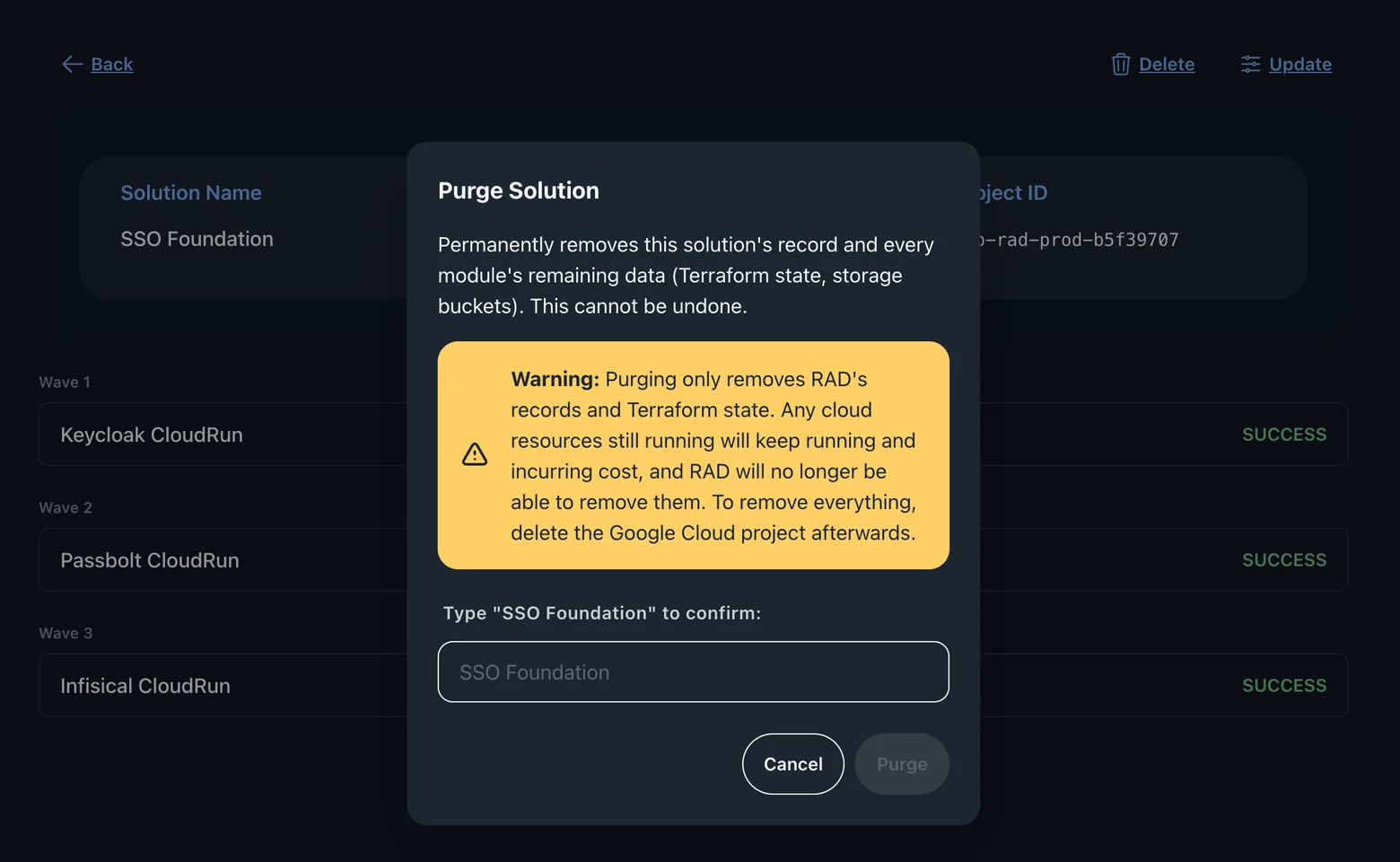
A shared project or a shared service is destroyed after the things living inside it have gone, not before. Getting this ordering wrong turns a clean teardown into a set of failed destroys and orphaned resources.
Bring-your-own project is the default. The alternative exists for teams inside your organisation without one: a proof of concept, a training cohort, an external contributor. Each tier is a separate Google Cloud folder with its own policy set, so rules cannot drift between tiers.
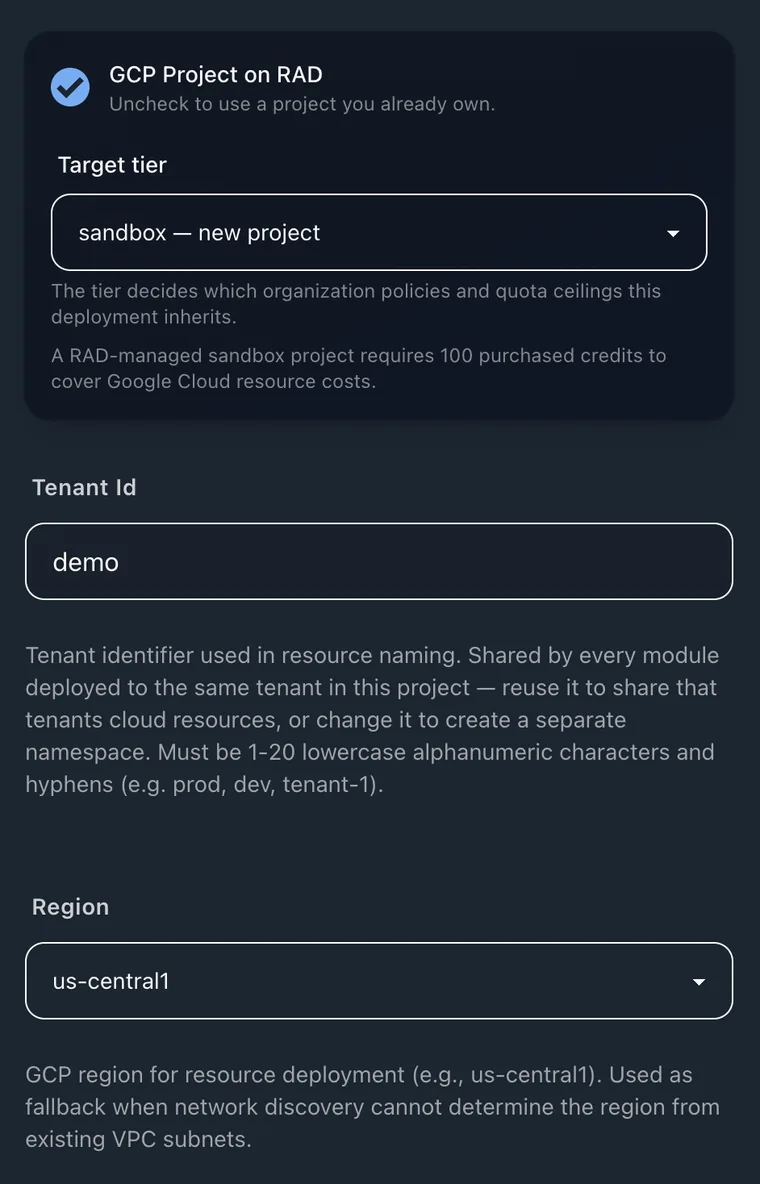
The tier is chosen at deploy time, and it is the tier — not the module — that decides which organisation policies and quota ceilings the project inherits. The purchased-credit floor for that tier is stated in the same panel.
The production tier is governed and quota-bounded: it takes development's ceilings. A workload needing more than 48 vCPU or 32 GB of Redis in one region is refused, though every ceiling is raisable per project on request. Your own project keeps your own quotas.
A RAD-managed project deploys into one region in each of eight geographies: us-central1, europe-north2, northamerica-south1, me-west1, africa-south1, asia-east1, australia-southeast2 and southamerica-west1. Each is the cheapest available region in its geography.
A short list opts out, each named on the catalogue page with the reason it cannot go there. Everything else can be deployed either way.
The minimum is set per tier, appropriate to what that tier can do. Free monthly credits do not satisfy it.
An alert notifies as spend approaches and exceeds the figure. It does not block an API call; the enforcement mechanism is separate.
We hold no security certification or third-party audit attestation. What follows is the mechanism itself, described precisely enough for your reviewer to judge it.
What a caller is allowed to do is decided from their stored user record, never from anything the browser sends. A client cannot assert a role it does not hold.
A support agent can see a customer's deployments only while a ticket assigned to them is open. Resolving or closing the ticket ends that access; reopening restores it.
Raw configuration values and deployment outputs are never readable by support staff, and neither is anything that destroys infrastructure. Reading a deployment across a tenant boundary writes an audit record.
A credit grant, a charge or a manual adjustment is recorded as an audit entry, not merely as a log line.
If a user's purchased credit balance falls below the minimum for the project's tier, or its Google Cloud usage goes unpaid, RAD is designed to disable Google Cloud billing on the managed project it created, and to restore it once the balance is topped up. It only reverses a suspension it applied itself.
Every one of these is an administrator setting in the platform, not a bespoke build. A private instance is the same RAD, pointed at your boundary.
The instance is bound to your Google Cloud organisation ID. Scope can be narrowed further to a single folder, so operations never reach beyond it, or left organisation-wide.
The billing account associated with the resources is yours. Nothing RAD provisions on your behalf lands on ours, and the spend is visible where you already track it.
Private mode restricts access to internal users only. The instance does not accept public signups at all, so the only accounts on it are the ones you have provisioned.
Modules can be managed only in GitHub and synced automatically, with publishing and deleting from the console disabled. Your review process becomes the only way in.
Enforce Update Safe makes any field a module has not marked update-safe read-only while a deployment runs. Changing one then means destroy and redeploy, deliberately.
The retention period, the soft-delete grace window, orphan cleanup and whether users are warned before a record is deleted are all set by your own administrators.
What does not exist yet is a self-service installer. A private deployment is an engagement: we stand it up with you, against your organisation and your review.
Every deployment is charged against a credit balance, and every charge is a row you can read and export. Credits are the unit: 10 credits = $1.
Between 40 and 300 credits depending on the module's complexity, and none for a handful of infrastructure options. The confirmation step quotes the whole chain, including the project and shared services RAD sets up.
Charged from how long the provisioning job actually ran, at a published per-hour credit rate. Most modules build in well under half an hour, and in the current release a failed deployment is not charged at all.
Credit history is per-transaction and exportable, so a platform team can attribute spend back to the team or project that caused it rather than reconstructing it from cloud billing alone.
A solution reserves its cost as one sum across every member, with a bundle discount that widens as the solution grows: 15% on three to four modules, 20% on five to six, and 25% on seven or more.
The catalogue is not a closed set. The same publishing path that brings a partner's module in works for a module of your own.
An administrator grants the Partner role, and you connect a GitHub repository containing your own modules through the RAD Module Sync app. They sync on every push, and RAD renders the same guided form your teams already use for catalogue modules.
An internal pattern and a catalogue module are deployed the same way, charged the same way and recorded the same way, because two systems produce two answers to "what is deployed".
A module you do not mark public stays private to the account that published it, plus any people it names by email. If a module must be visible to your whole organisation and nobody else, raise it with us as part of an evaluation rather than assuming it.
Better to read this now than to discover it in week three of an evaluation.
Every module in the catalogue targets Google Cloud. If your requirement is one console spanning several cloud providers, RAD is not that.
If your organisation has standardised on another infrastructure language and will not accept Terraform state as an artefact, the catalogue has nothing for you.
The catalogue, the engine and the documentation are built and running. Newer features such as lab sessions are early access.
RAD earns its keep across many deployments and teams. For one small application one engineer maintains forever, writing the Terraform yourself is cheaper.
One module, into one project you already own, reviewed by the person who would have to sign it off.
Use one that carries your real org policies. If a policy blocks the deployment, that is the evaluation working: RAD cannot widen your boundary.
Open the resources in your own console, alongside the configuration guide, outputs and build log RAD publishes. Judge what was created as you would judge a submission from a team.
The ordering on the way down is where estate orchestration is either real or not. Watch the shared foundation go last.
Export the credit history for the week and check it reconciles against what you saw deployed.
Everything a reviewer usually asks for is on this site or in the documentation. Nothing is behind a form.
The deployment path end to end: estate orchestration, teardown ordering, and the two places RAD deploys into.
Platform350+ deployment options, 190+ applications and platform modules, and the ones excluded from a managed project.
Modules340+ hands-on labs, 520+ module configuration guides and 40+ certification study guides across 7 tracks.
Open the docsOwnership, lock-in, what a spend alert does not do, and exactly who can see your deployments, and when.
FAQThe same argument in one document, for circulating to people who will not read a website: operating model and cost.
Read the brochureTell us which project you want to deploy into and which pattern your teams keep rewriting. We will help you get one module into one of your own projects this week.